



















































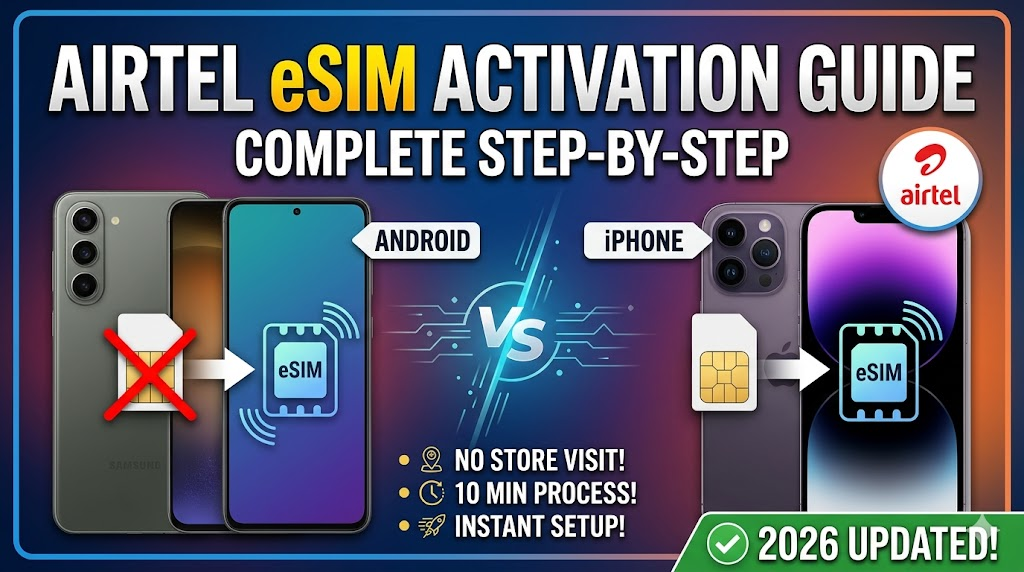
Airtel eSIM Activation Guide 2026: Complete Step-by-Step Process for Android & iPhone
Airtel eSIM is a digital SIM technology that allows users to activate mobile services without inserting a physical SIM card. It is especially useful for premium smartphones such as iPhone, Google Pixel, Samsung Galaxy, and other eSIM-supported devices. The activation process is simple and can be completed through the Airtel Thanks App. In this guide, we explain the complete Airtel eSIM activation process, OTP verification, call confirmation, and device configuration steps so you can switch from a physical SIM to an eSIM without any hassle.
Step 1: Initiate eSIM Request Through Airtel Thanks App
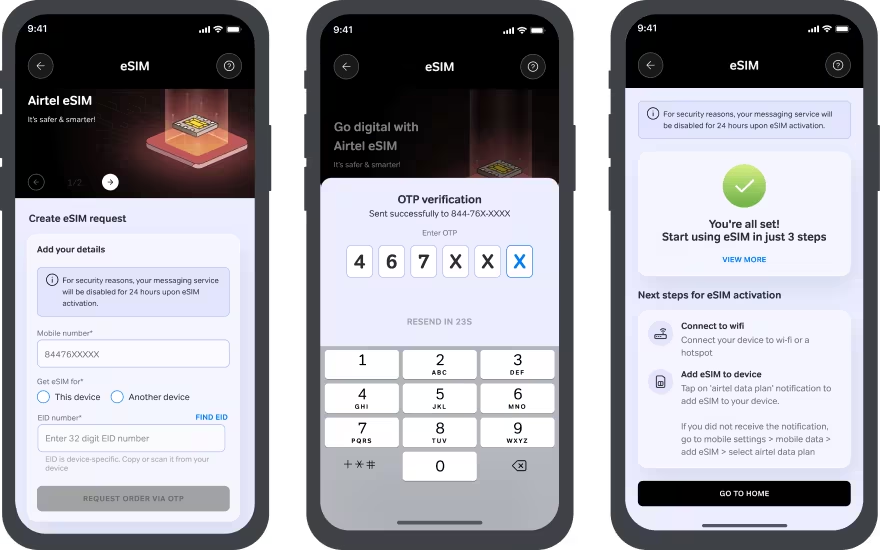
Download and install the Airtel Thanks App from the Google Play Store or Apple App Store. Log in using the Airtel number you want to convert into an eSIM. Navigate to the Home page and select the “Upgrade to eSIM” option. Choose your device and enter the required EID number if prompted.
Step 2: Verify OTP on Registered Mobile Number
After submitting the eSIM request, Airtel will send an OTP to your registered mobile number. Enter the OTP correctly in the app to verify your identity and continue the activation process.
Step 3: Complete Call Verification
Airtel performs a verification call before processing the eSIM request. You may receive the call within a few minutes after submitting your application. Confirm the request during the call to proceed with eSIM activation.
Step 4: Download and Configure eSIM Profile
Once verification is completed, Airtel will push the eSIM profile to your device. Download the profile and follow the on-screen instructions. The activation process generally completes within a few hours.
How to Configure Airtel eSIM on iPhone
For Apple iPhone users:
- Connect your iPhone to Wi-Fi or mobile data.
- Open the notification received from Airtel.
- Tap the eSIM setup notification.
- Select “Continue” to start activation.
- Follow the on-screen instructions.
- Choose your default line settings.
- Restart the device if required.
Benefits of Using Airtel eSIM
Airtel eSIM offers several advantages:
- No physical SIM card required.
- Easy switching between devices.
- Better security against SIM theft.
- Supports dual SIM functionality.
- Convenient for international travelers.
- Faster device setup and management.
Extra Safety Tips 2026
• Keep your registered mobile number active during activation.
• Ensure your smartphone supports eSIM functionality.
• Maintain a stable internet connection during setup.
• Do not remove your physical SIM until eSIM activation is complete.
• Contact Airtel Customer Care if activation exceeds the expected time.
FAQs
Q1. What is an Airtel eSIM?
Airtel eSIM is a digital SIM profile embedded into compatible smartphones, eliminating the need for a physical SIM card.
Q2. How long does Airtel eSIM activation take?
Typically, activation is completed within a few hours after profile download and verification.
Q3. Can I convert my existing Airtel SIM into an eSIM?
Yes, Airtel allows existing prepaid and postpaid customers to convert their physical SIM into an eSIM.
Q4. Does Google Pixel support Airtel eSIM?
Yes, many Google Pixel models including Pixel 7, Pixel 8, and newer devices support Airtel eSIM.
Q5. What should I do if Airtel eSIM is not working?
Restart your device, check network settings, ensure the eSIM profile is active, and contact Airtel support if the issue persists.
| SEO Element | Details |
|---|---|
| Focus Keyword | Airtel eSIM Activation |
| SEO Title | Airtel eSIM Activation Guide 2026 – Complete Setup Process for Android & iPhone |
| Meta Description | Learn how to activate Airtel eSIM on Android and iPhone with this complete step-by-step guide including OTP verification and setup instructions. |
| Category | Guide |
| Tags | Airtel eSIM, eSIM Activation, Airtel Thanks App, iPhone eSIM, Android eSIM |
| Reading Time | 4-5 Minutes |
Join Our WhatsApp Channel
Hamse Judo, Pehle Jano
Latest Jobs, Recruitment Updates, Tender News & Career Opportunities
Conclusion
Airtel eSIM provides a modern and convenient way to use mobile connectivity without relying on a physical SIM card. The activation process through the Airtel Thanks App is straightforward and includes OTP verification, call confirmation, and device configuration. Whether you are using an iPhone, Google Pixel, or Samsung Galaxy device, switching to an Airtel eSIM can improve convenience, security, and flexibility. Follow the steps outlined above carefully to ensure a smooth activation experience and enjoy the benefits of digital SIM technology in 2026.
Related Posts
Editor’s Pick
 Read more: Google Gemini AI Photo Editing Prompts for Eid al-Fitr in 2026
Google Gemini AI Photo Editing Prompts for Eid al-Fitr in 2026
on
 Read more: Gemini AI se Professional Photos Kaise Banaye? 2026 ki Best Prompt Guide!
Gemini AI se Professional Photos Kaise Banaye? 2026 ki Best Prompt Guide!
on
- Read more: Viral 3D Social Media Avatar Kaise Banaye? (Apne Naam Wali Photo Guide)
Viral 3D Social Media Avatar Kaise Banaye? (Apne Naam Wali Photo Guide)
on
- Read more: Samsung One UI 8.5 Latest Update Guide – Features, Eligible Devices, Release Date Full Details
Samsung One UI 8.5 Latest Update Guide – Features, Eligible Devices, Release Date Full Details
on




Comments
Have you successfully activated Airtel eSIM on your smartphone? Share your experience and troubleshooting tips in the comments below.

AFFAN DC