
📢 UAN Activation Now Only on UMANG App: Step-by-Step Guide (2026 Update)

A major update from Employees’ Provident Fund Organisation has changed how employees activate their UAN (Universal Account Number).
👉 Now, UAN activation can ONLY be done through the UMANG App — not on the EPFO website anymore.
This change is part of a digital upgrade to make the process faster, safer, and error-free.
🔍 What Has Changed?
- ❌ UAN activation via EPFO website → Removed
- ✅ Activation via UMANG app → Mandatory
- 🔐 New method includes Aadhaar + OTP + Face Authentication
Since August 2025, EPFO has made it compulsory to use UMANG with Face Authentication Technology (FAT) for both UAN generation and activation.
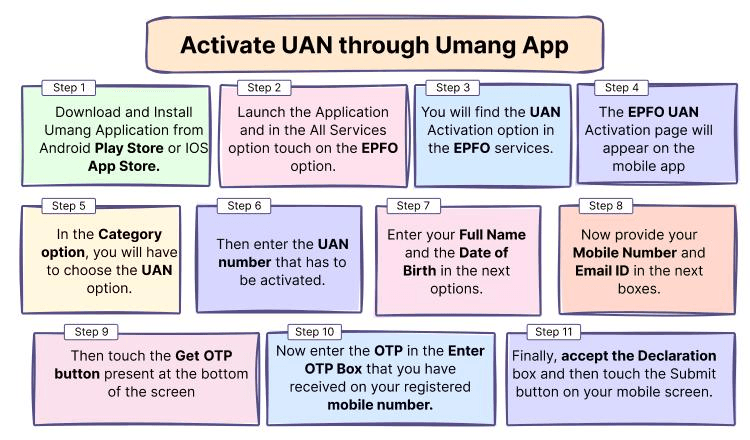
📲 How to Activate UAN on UMANG App (Step-by-Step)
Follow these simple steps:
1️⃣ Download & Open App
- Install UMANG App from Play Store/App Store
- Login or register with mobile number
2️⃣ Go to EPFO Services
- Search EPFO inside the app
- Click on “UAN Allotment and Activation”
3️⃣ Enter Required Details
Fill in:
- UAN number (if already allotted)
- Aadhaar number
- Mobile number
👉 Give consent for Aadhaar verification
4️⃣ Verify with OTP
- Enter OTP received on your mobile
- System verifies your details
5️⃣ Complete Face Authentication (Important)
- Use Aadhaar Face RD App for face scan
- This step confirms your identity securely
6️⃣ UAN Activated 🎉
- You’ll receive:
- Confirmation SMS
- Temporary password
- Now you can log in to EPFO services
📌 The entire process is digital and takes just a few minutes.
📋 What You Need Before Activation
Keep these ready:
- Aadhaar card
- Registered mobile number
- UAN (if already generated)
- Smartphone with camera (for face verification)
❗ Why This Change Matters
✅ Benefits
- Faster and fully digital process
- No dependency on employer
- More accurate data (less errors)
- Instant access to PF services
⚠️ Challenges
- Requires smartphone + internet
- Face authentication may fail in poor lighting
- Some users reported app issues earlier
💡 Why UAN Activation is Important
Without activating your UAN, you cannot:
- Check PF balance
- Download passbook
- File PF withdrawal claims
- Update KYC details
👉 In short: No activation = No EPF services
🚀 Final Takeaway
The shift to the UMANG App makes UAN activation simpler but mandatory through mobile only.
👉 If your UAN is still not activated, don’t wait —
complete the process now to avoid issues with PF access.